How to manually trigger Firebase Functions in the emulator
A complete guide to calling HTTP, callable, Pub/Sub, Cloud Tasks and scheduled functions in the Firebase emulator.
Published April 24, 2026
By Val
The Firebase emulator is able to run your Firebase Functions, whether it’s HTTP, callable, Pub/Sub, task queues or scheduled functions.
It works out of the box when you call them programmatically from your app (except for scheduled functions that never run locally), but when working on a function, it’s usually easier to call it directly, especially for the ones that are triggered by non-trivial actions in your app.
The emulator UI on localhost:4000 has a basic admin panel for Firebase
Auth, Firestore and Cloud Storage, but not for Functions. Just this sad
panel with logs only:

In this guide, we’ll cover how to manually trigger:
Calling functions with cURL
To solve this, cURL is our friend.
With the Functions emulator running on default port 5001, your typical call
will look like this:
curl -X POST 'http://localhost:5001/{project}/{region}/{function}' \
    -H 'Content-Type: application/json' \
    -d '{data}'
Where region is e.g. us-central1 (default), and function is your
function name.
So if your project is my-project and your function is defined as:
import * as functions from 'firebase-functions/v2'

export const httpFunction = functions.https.onRequest((request, response) => {
  response.json({ ok: true })
})
import * as functions from 'firebase-functions/v1'
export const httpFunction = functions.https.onRequest((request, response) => {
response.json({ ok: true })
})Its URL will be:
http://localhost:5001/my-project/us-central1/httpFunctionAnd with a custom region:
export const httpFunction = functions.https.onRequest(
  { region: 'europe-west1' },
  (request, response) => {
    response.json({ ok: true })
  }
)
export const httpFunction = functions
.region('europe-west1')
.https.onRequest((request, response) => {
response.json({ ok: true })
})We get:
http://localhost:5001/my-project/europe-west1/httpFunctionNow the JSON payload is gonna be different depending on the kind of function, and in some cases, whether you use 1st gen or 2nd gen functions.
HTTP functions
This is the easiest one because you control the payload entirely, so just pass your payload directly in the HTTP body and you’ll get it in the function.
Example function:
export const httpFunction = functions.https.onRequest((request, response) => {
  console.log({ url: request.url, body: request.body })
  response.json({ ok: true })
})
We can call it as:
curl -X POST 'http://localhost:5001/my-project/us-central1/httpFunction' \
    -H 'Content-Type: application/json' \
    -d '{"foo": "bar"}'
It will log:
{
  url: '/',
  body: {
    foo: 'bar'
  }
}
We can also call it with a custom path:
curl -X POST 'http://localhost:5001/my-project/us-central1/httpFunction/hello' \
    -H 'Content-Type: application/json' \
    -d '{"foo": "bar"}'
Which will log:
{
  url: '/hello',
  body: {
    foo: 'bar'
  }
}
This is identical for both 1st and 2nd gen functions.
Callable functions
They’re defined slightly differently in 1st and 2nd gen, but they’re called the same way.
export const callableFunction = functions.https.onCall(request => {
  console.log({ data: request.data, auth: request.auth })
  return { ok: true }
})
export const callableFunction = functions.https.onCall((data, context) => {
console.log({ data, auth: context.auth })
return { ok: true }
})Unauthenticated call
curl -X POST 'http://127.0.0.1:5001/my-project/us-central1/callableFunction' \
    -H 'Content-Type: application/json' \
    -d '{"data": {"foo": "bar"}}'
Will log:
{
  data: {
    foo: 'bar'
  },
  auth: undefined
}
Authenticated call with ID token
We can also pass an Authorization: Bearer header. It takes a Firebase Auth ID
token that will automatically be parsed and validated by the functions SDK.
Here’s our cURL call with that token:
curl -X POST 'http://127.0.0.1:5001/my-project/us-central1/callableFunction' \
    -H 'Content-Type: application/json' \
    -H 'Authorization: Bearer {firebaseAuthIdToken}' \
    -d '{"data": {"foo": "bar"}}'
Which will log:
{
  data: {
    foo: 'bar',
  },
  auth: {
    uid: '...',
    token: { name, email, ... },
    rawToken: '...'
  }
}
Authenticated call with arbitrary token
If you want to use your own non-Firebase token for some reason, this also works:
curl -X POST 'http://127.0.0.1:5001/my-project/us-central1/callableFunction' \
  -H 'Content-Type: application/json' \
  -H 'Authorization: Bearer my-token' \
  -d '{"data": {"foo": "bar"}}'
{
data: {
foo: 'bar',
},
auth: {
token: {},
rawToken: 'my-token'
}
}Pub/Sub functions
Here we’ll cover calling Pub/Sub functions directly, with a payload that’s compatible with what the Pub/Sub emulator would otherwise send.
If you want to manually publish messages to the Pub/Sub emulator, check out our dedicated guide for calling the Pub/Sub emulator.
export const pubsubFunction = functions.pubsub.onMessagePublished(
  { topic: 'my-topic' },
  event => {
    // `event.data.message.json` is a computed property so we need to log it separately
    console.log({ event, json: event.data.message.json })
  }
)
export const pubsubFunction = functions.pubsub
.topic('my-topic')
.onPublish(message => {
// `message.json` is a computed property so we need to log it separately
console.log({ message, json: message.json })
})For some reason in the emulator URL, Pub/Sub functions are suffixed with -0,
so in this case the URL will be:
http://127.0.0.1:5001/my-project/us-central1/pubsubFunction-0We can call it with:
curl -X POST 'http://127.0.0.1:5001/my-project/us-central1/pubsubFunction-0' \
    -H 'Content-Type: application/json' \
    -d '{"data": {"message": {"data": "eyJmb28iOiJiYXIifQ=="}}}'
curl -X POST 'http://127.0.0.1:5001/my-project/us-central1/pubsubFunction-0' \
-H 'Content-Type: application/json' \
-d '{"data": {"data": "eyJmb28iOiJiYXIifQ==", "attributes": {}}}'The Base64 payload in data above is the same {"foo": "bar"} example from
earlier:
Buffer.from(JSON.stringify({ foo: 'bar' })).toString('base64')
// 'eyJmb28iOiJiYXIifQ=='
For convenience we can embed the Base64-encoding in the same command:
curl -X POST 'http://127.0.0.1:5001/my-project/us-central1/pubsubFunction-0' \
    -H 'Content-Type: application/json' \
    -d '{"data": {"message": {"data": "'$(echo '{"foo": "bar"}' | base64)'"}}}'
curl -X POST 'http://127.0.0.1:5001/my-project/us-central1/pubsubFunction-0' \
-H 'Content-Type: application/json' \
-d '{"data": {"data": "'$(echo '{"foo": "bar"}' | base64)'", "attributes": {}}}'The function will log:
{
  event: {
    data: {
      message: {
        data: 'eyJmb28iOiJiYXIifQ==',
        publishTime: '2026-04-20T00:00:00.000Z'
      }
    }
  },
  json: {
    foo: 'bar'
  }
}
{
message: {
data: 'eyJmb28iOiJiYXIifQ==',
attributes: {}
},
json: {
foo: 'bar'
}
}Task queue functions
export const taskQueueFunction = functions.tasks.onTaskDispatched(
  {
    retryConfig: {
      maxAttempts: 5,
      minBackoffSeconds: 60,
    },
    rateLimits: {
      maxConcurrentDispatches: 6,
    },
  },
  async request => {
    console.log({ data: request.data })
  }
)
export const taskQueueFunction = functions.tasks
.taskQueue({
retryConfig: {
maxAttempts: 5,
minBackoffSeconds: 60,
},
rateLimits: {
maxConcurrentDispatches: 6,
},
})
.onDispatch(async data => {
console.log({ data })
})In both 1st and 2nd gen, we need to call the function with a data property in
the body.
curl -X POST 'http://localhost:5001/my-project/us-central1/taskQueueFunction' \
  -H 'Content-Type: application/json' \
  -d '{"data": {"foo": "bar"}}'
Which will log:
{
  data: {
    foo: 'bar'
  }
}
This calls the task queue directly. If you’re interested in invoking the Cloud Tasks emulator instead, check out our Cloud Tasks emulator guide.
Scheduled functions
export const scheduledFunction = functions.scheduler.onSchedule(
  {
    schedule: 'every 30 minutes',
    timeZone: 'UTC',
  },
  event => {
    console.log({ event })
  }
)
export const scheduledFunction = functions.pubsub
.schedule('every 30 minutes')
.timeZone('UTC')
.onRun(context => {
console.log({ context })
})Like Pub/Sub functions those are suffixed with -0 for some reason (I have yet
to find out in what conditions we see a -1 suffix).
Scheduled functions don’t take any payload, they just get triggered.
curl -X POST 'http://127.0.0.1:5001/my-project/us-central1/scheduledFunction-0' \
  -H 'Content-Type: application/json' \
  -d '{}'
This will log:
{
  event: {
    scheduleTime: '2026-04-20T00:00:00.000Z',
  }
}
{
context: {
// This is forwarded from the body but not sure what that represents in production
params: {
}
}
}Other triggers
I’m intentionally skipping Auth, Firestore, Realtime Database, Cloud Storage and others triggers, because of how tightly coupled they are to the underlying service.
You’re better off testing those by performing the actual action that triggers it.
If you have a use case for manually triggering some of those, I’m curious to know about it! Let me know at val@evetools.app.
How Flame can help ✨
All of this works, but what if localhost:4000 had a functions UI that deals with
all the underlying details highlighted in this guide?
That’s why we’re building Flame, a Firebase GUI with everything
that’s missing from localhost:4000.
See all your functions and call them with a single click:
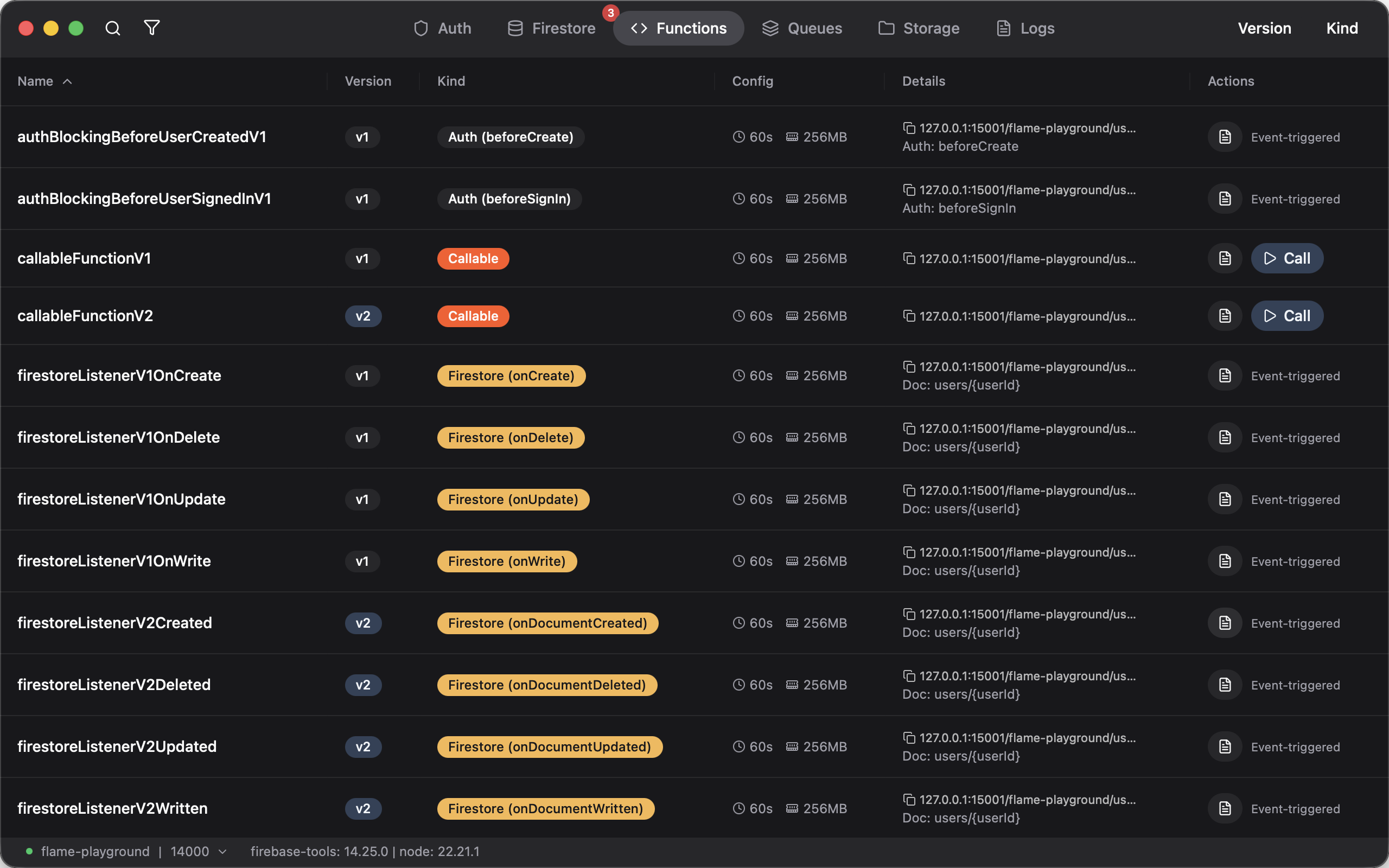
Tweak the body, copy as cURL with all the encoding dealt with, and call it as many times as you want from the UI.
See it in action:
No terminal wrestling, no memorizing URL patterns, no manual Base64 encoding. Flame handles HTTP functions, callable functions, Pub/Sub functions, task queues, and scheduled functions, all from the same UI.
Also comes with an improved UI for Firebase Auth, Firestore, and more.
If that sounds exciting to you, give Flame a try!