Catch missing Firestore indexes before production
The emulator does not fail queries that need a composite index. Find those indexes and add them to firestore.indexes.json before they break production.
Veröffentlicht am 20. August 2026
Von Val
A query that works on the Firestore emulator often fails the first time you run it in production:
FirebaseError: The query requires an index. You can create it here: https://console.firebase.google.com/...The emulator does not require composite indexes. Production does. You click the link, wait for the index to build, and the query starts working. The indexes file in your repo stays unchanged unless you remember to export it.
A query that needs an index
Equality on one field plus a sort on another needs a composite index:
import { collection, query, where, orderBy } from 'firebase/firestore'

const posts = query(
  collection(db, 'posts'),
  where('published', '==', true),
  orderBy('createdAt', 'desc')
)
Locally this returns documents. Against a live database it fails until you add:
{
  "indexes": [
    {
      "collectionGroup": "posts",
      "queryScope": "COLLECTION",
      "fields": [
        { "fieldPath": "published", "order": "ASCENDING" },
        { "fieldPath": "createdAt", "order": "DESCENDING" }
      ]
    }
  ]
}
Single-field indexes at collection scope are automatic. You only declare composite indexes, and single-field indexes that use collection-group scope.
Ask the emulator which indexes were used
The Firestore emulator keeps a report of indexes required by the queries it
has served. With the emulator on the default port 8080:
curl 'http://localhost:8080/emulator/v1/projects/my-project:indexUsage?database=projects/my-project/databases/(default)'Change my-project and the port to match firebase.json. After you run the
posts query, the response looks like this:
{
  "reports": [
    {
      "index": {
        "name": "projects/my-project/databases/(default)/collectionGroups/posts/indexes/_",
        "queryScope": "COLLECTION",
        "fields": [
          { "fieldPath": "published", "order": "ASCENDING" },
          { "fieldPath": "createdAt", "order": "DESCENDING" },
          { "fieldPath": "__name__", "order": "ASCENDING" }
        ]
      },
      "numQueries": "1"
    }
  ]
}
The report lists indexes the emulator used, including ones you already
declared. Diff it against firestore.indexes.json. Drop __name__: Firestore
adds the document ID field itself.
Collection group queries
collectionGroup('posts') needs "queryScope": "COLLECTION_GROUP". A
single-field collection-group index does not go in indexes. It goes in
fieldOverrides:
{
  "fieldOverrides": [
    {
      "collectionGroup": "posts",
      "fieldPath": "createdAt",
      "indexes": [
        { "order": "ASCENDING", "queryScope": "COLLECTION" },
        { "order": "DESCENDING", "queryScope": "COLLECTION" },
        { "arrayConfig": "CONTAINS", "queryScope": "COLLECTION" },
        { "order": "DESCENDING", "queryScope": "COLLECTION_GROUP" }
      ]
    }
  ]
}
Keep the three COLLECTION entries. They replace the automatic single-field
index for that field. An empty indexes array turns indexing off for that
field, which is how TTL fields are often configured.
Deploy the indexes
firebase deploy --only firestore:indexesCreating the index from the production error link does not update your repo. The indexes file is the source of truth if you want the same indexes in every environment.
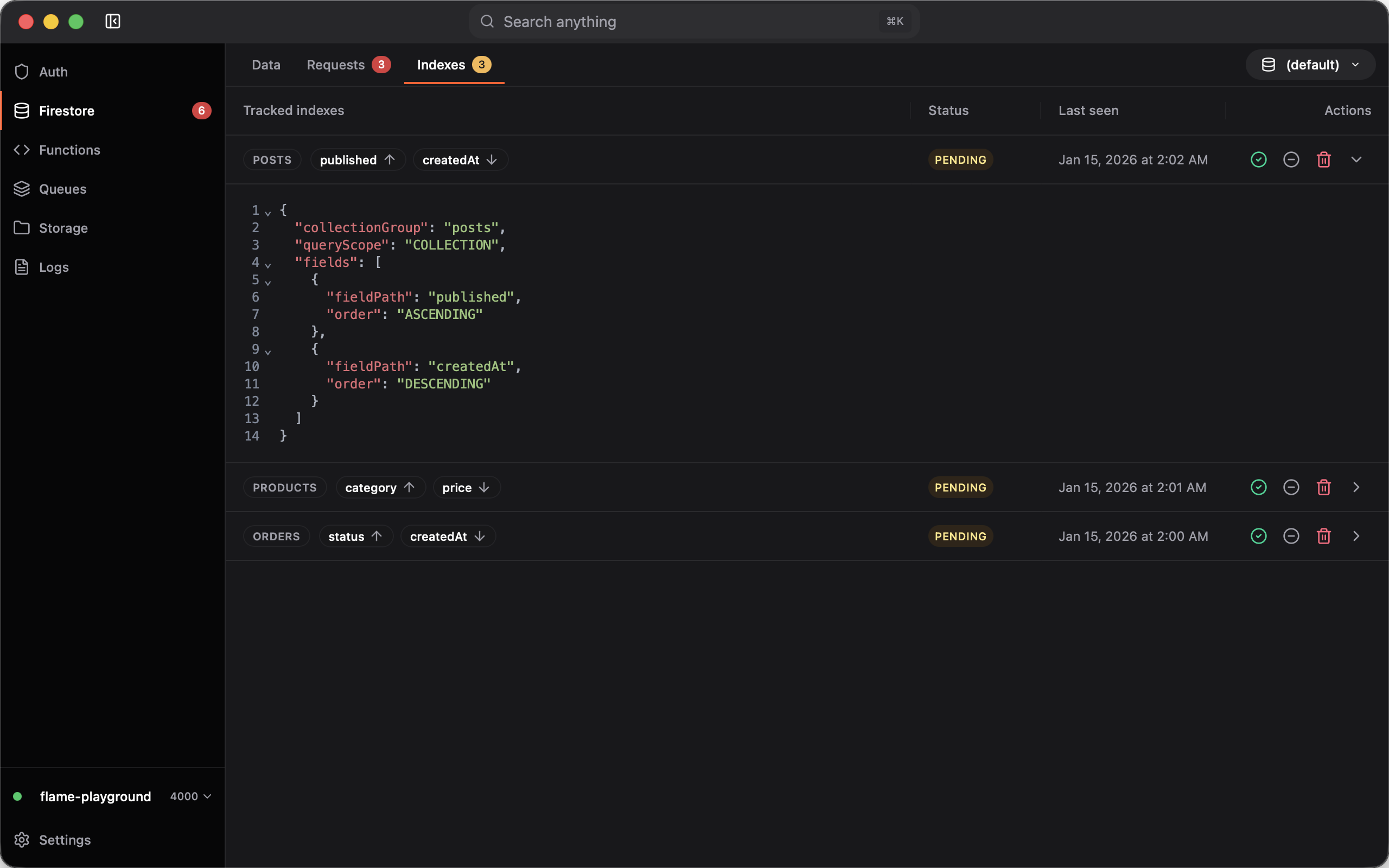
Flame: index suggestions from the emulator
Flame watches the same indexUsage report and diffs it against your
indexes file.
Open Firestore → Indexes. After your app runs queries, missing indexes show
up as pending rows. Open a row to see the JSON. Apply writes it to
firestore.indexes.json (composite indexes into indexes, collection-group
single-field indexes into fieldOverrides). Dismiss it if you do not want it.
Flame reads the indexes path from firebase.json. You can leave the window in
the background: enable Show notifications for missing Firestore indexes in
Settings, and keep the menu bar or tray icon on. A system notification fires
when a new missing index appears.
Flame only does this for the emulator. A live project already rejects the query.
Also comes with an improved UI for Firebase Auth, Firestore, Functions, and more. Try it out!